
ConvoAI

How it works

From signup to yourfirst answered customer

ConvoAI puts an AI agent in the messenger on your website, and on your WhatsApp number and support email when you want it there too. No decision trees: connect, teach it your business and go live.

  1. 01ConnectPaste one script tag to put the messenger on your site. Add WhatsApp or email whenever you like.
  2. 02TeachUpload your FAQs, prices, menu or catalog. The agent learns them in seconds.
  3. 03Go liveTest it in the sandbox, tune its personality and switch it on.

Getting started

Three steps. No developers.

Setup happens in the dashboard. If you can paste a link, you can launch an agent.

  1. Step 01

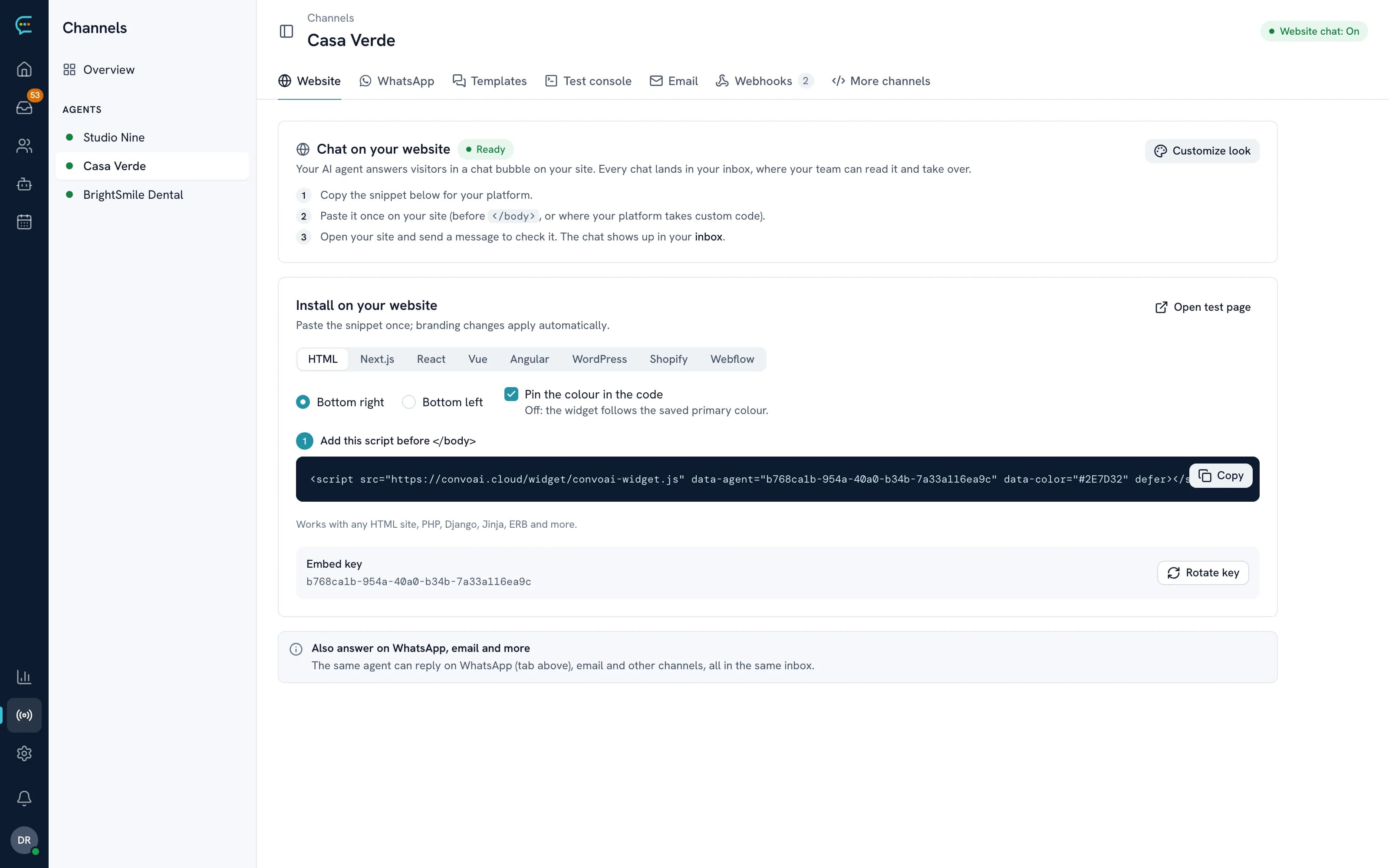
    Add the messenger to your website

    Paste one script tag and the ConvoAI messenger appears on every page of your site: no Meta account, no phone number, no approval. When you want the agent on more channels, link your WhatsApp Business number through Meta's official Cloud API with the setup wizard, or forward your support email.

    • One script tag for any website
    • WhatsApp through the official Meta Cloud API
    • Support email by forwarding
    convoai.cloud/app/channels/casa-verde
    Installing the ConvoAI chat on a website with one script tag
  2. Step 02

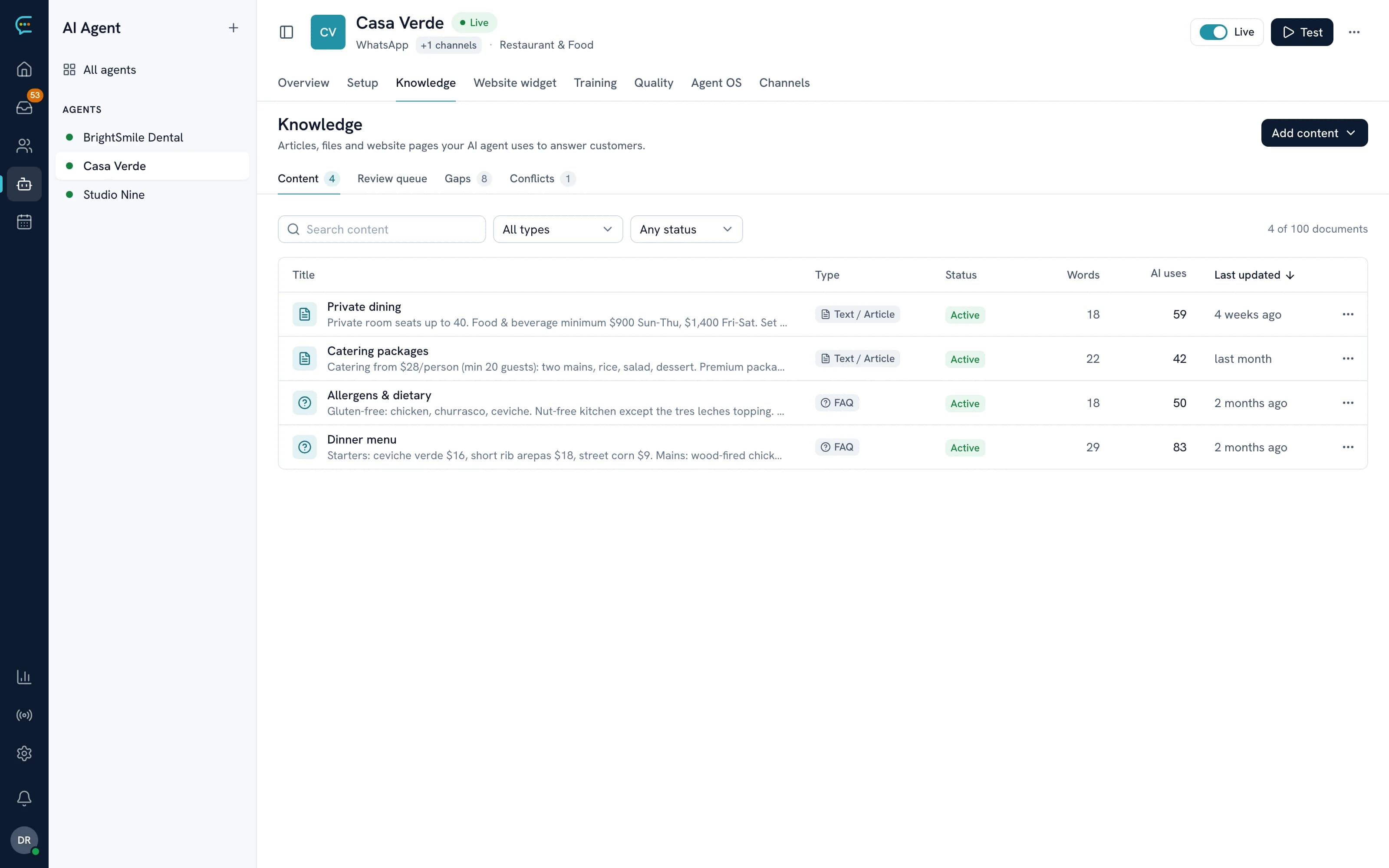
    Teach it your business

    Drop in your FAQs, prices, menu, product details, policies and service descriptions as text, PDFs or links. This is what the agent answers from, and you can update it any time.

    • Text, PDF, CSV and links
    • Whole-site crawling
    • Changes apply right away
    convoai.cloud/app/agents/casa-verde/knowledge
    ConvoAI knowledge base with articles and FAQs
  3. Step 03

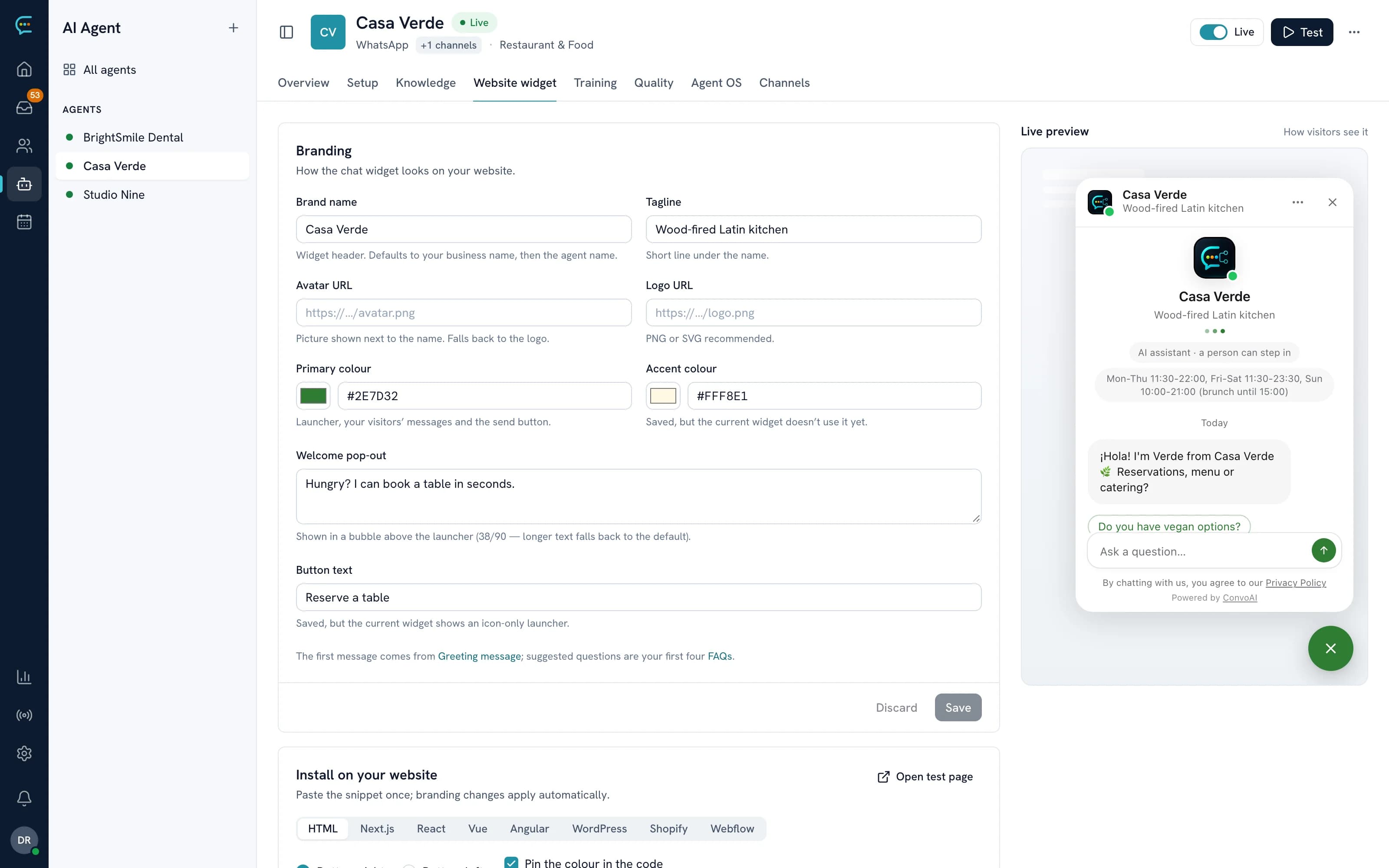
    Test it, then switch it on

    Chat with your agent in the built-in test panel, set its personality and escalation rules, then go live on every connected channel. Pause it any time and your team takes over in the inbox.

    • Built-in test panel
    • Custom personality and tone
    • Pause any time
    convoai.cloud/app/agents/casa-verde/widget
    ConvoAI chat widget branding with live preview

The conversation flow

What happens when a customer writes in

ConvoAI retrieves the right content, combines it with the conversation and your instructions, and generates a reply grounded in what you gave it. If it can't answer, it escalates.

  1. 1

    A customer writes

    A visitor asks a question in the messenger on your website, or a message arrives on WhatsApp or by email. Every channel routes into ConvoAI.

  2. 2

    It finds the answer

    The agent searches your documents, prices, FAQs and policies by meaning for what this customer needs.

  3. 3

    It writes the reply

    Your content plus the full conversation and your brand voice become a natural reply, in the customer's language.

  4. 4

    Same channel, right away

    The reply lands where the customer wrote. No app to install, no link to click.

  5. 5

    The lead is saved

    The conversation is logged, the contact profile is filled in and the lead score updates, so your team sees who's ready.

Not sure, or the customer is upset? The agent hands the conversation to your team with a summary instead of guessing.

What the agent will do

  • Answer questions from your knowledge base
  • Qualify leads with follow-up questions
  • Book appointments and capture key details
  • Hand off to your team at the right moment
  • Reply in whatever language the customer writes in
  • Match your brand voice

What it will never do

  • Make up information that isn't in your content
  • Mix data between numbers, channels or accounts
  • Message people who haven't opted in
  • Store card numbers or sensitive payment data
  • Show one customer another customer's conversation

Your dashboard

Everything in one place, no technical skills needed

Run every number and chatbox from one dashboard, each with its own agent, knowledge base and personality.

  • Live conversations

    Watch conversations as they happen, read every transcript and take over from the agent whenever you want.

  • Agent settings

    Personality, tone, language, fallback messages and escalation rules, so it sounds like your brand.

  • Knowledge manager

    Add, edit and remove documents, and see which content answers the most questions.

  • Contacts & CRM

    Filter by tag, lead score and pipeline stage, with full history per contact and CSV export.

  • Analytics

    Volume, resolution, response time, top questions, coverage gaps and satisfaction trends.

  • Test panel

    Chat with your agent from the dashboard to check answers before and after you go live.

By industry

Set up for the way your business talks

Wherever your customers message you, the same steps apply. What changes is what you teach the agent and what you let it do.

Restaurants

Fill tables and answer the menu questions your staff hears every night.

  • Reservations and changes
  • Menu, allergens and dietary questions
  • Hours, location and delivery areas

Table for 6 on Friday around 8?

I have 7:45 or 8:30 for six. Shall I book one?

Clinics & wellness

Appointments and intake questions answered on your website, reminders on WhatsApp, and anything clinical sent to your front desk.

  • Booking, rescheduling and reminders
  • Prices, insurance and preparation questions
  • Medical questions handed to staff

Can I move my cleaning to next week?

Of course. Tuesday 10:00 or Thursday 3:30?

Real estate

Qualify buyers and renters the moment they ask, then put viewings in your calendar.

  • Budget, area and timing questions
  • Listing details from your documents
  • Viewing bookings and follow-ups

Is the 2-bed on Coral Way still available?

It is! Are you looking to buy or rent, and when would you move?

Ecommerce

Answer from your live catalog, send checkout links and follow up on quiet carts.

  • Sizes, stock and shipping questions
  • Order status, tracking and returns
  • Recommendations and abandoned carts

Do you have the linen shirt in medium?

Yes, in sand and olive. Medium runs true to size. Want the size guide?

Salons & spas

Bookings with the right person, easy rescheduling and reminders so fewer clients forget.

  • Booking by service and stylist
  • Rescheduling and cancellations in chat
  • Reminders before every visit

Anything with Andrea tomorrow afternoon?

Andrea has 2:30 or 4:15 tomorrow. Which works?

Home services

Turn “can you come look at this?” into a scheduled visit, even after hours.

  • Quote requests, with photos of the job
  • Scheduling visits by service area
  • Follow-ups after quotes and jobs

My AC is leaking, can someone come this week?

Sorry about that! Send me a photo and your zip code and I'll find a slot.

For sales teams

Capture and qualify every lead

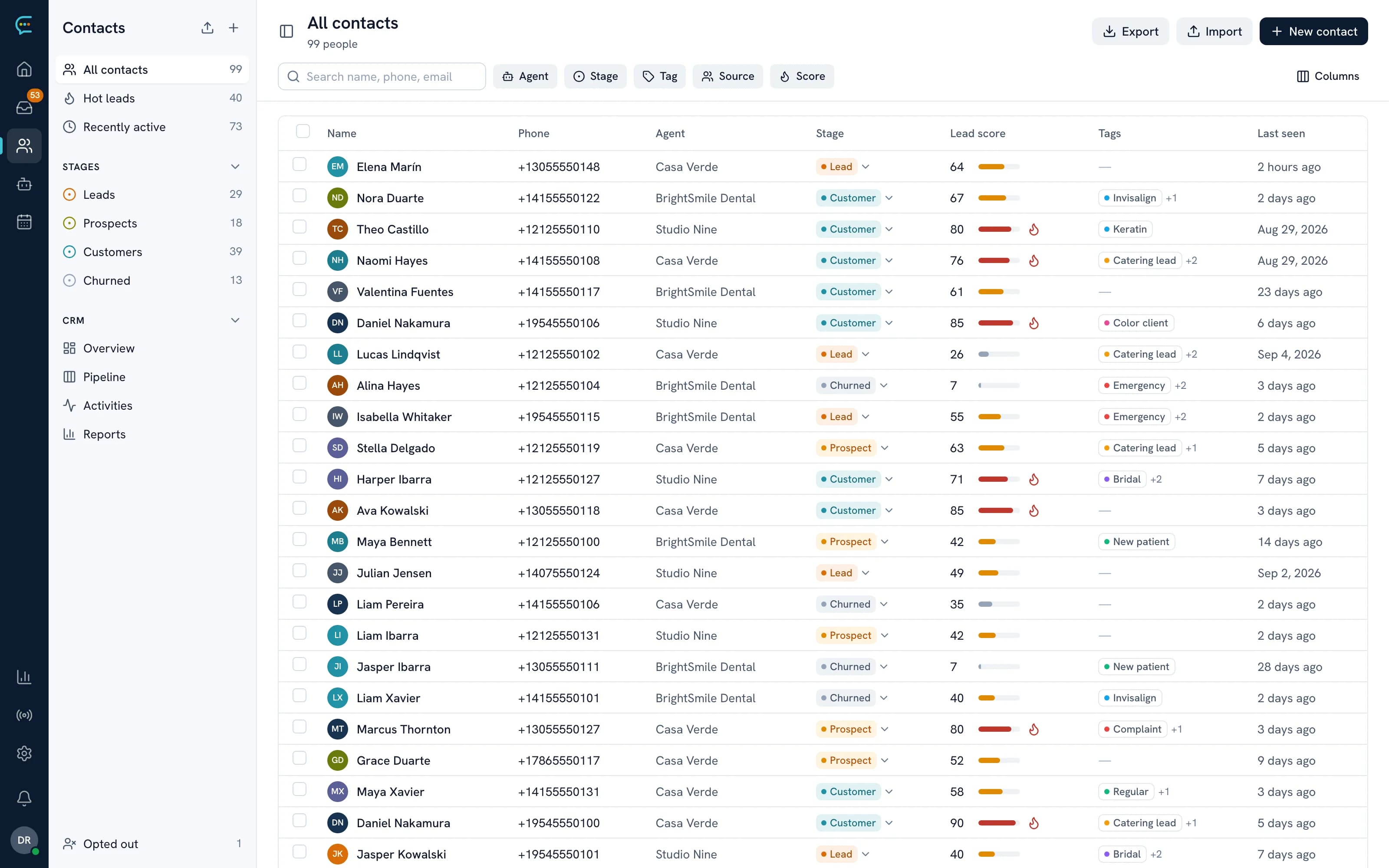
Leads that message at 11pm get an answer at 11pm. The agent asks the right follow-up questions, scores each lead on budget, urgency and intent, and flags the hot ones so your team only spends time on people ready to buy.

  • Lead scores from 0 to 100, updated as the conversation goes
  • Your own qualification criteria, matched to your sales process
  • Pipeline stages that move on their own
  • Follow-ups for leads that go quiet
convoai.cloud/app/contacts
ConvoAI contacts with stage and lead score

For support teams

Resolve the routine, escalate the rest

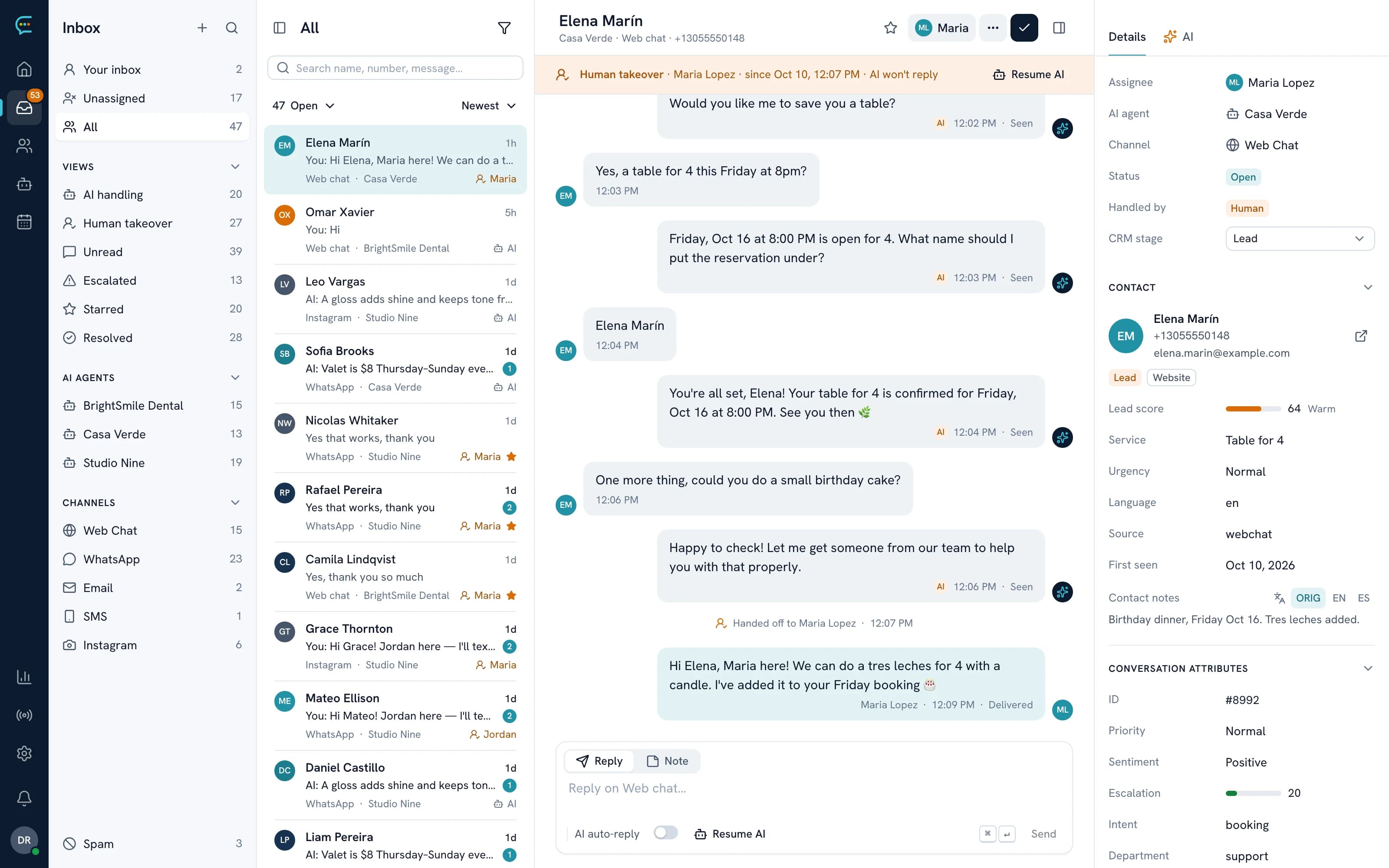
The agent answers the repeat questions instantly from your knowledge base, and when a conversation needs a person (a refund, a complaint, an upset customer) it hands it to your team with a summary in the shared inbox.

  • Answers grounded in your docs and policies
  • Handoffs with a summary, history and priority
  • Your team can take over or hand back at any time
  • Knowledge gaps surfaced so answers keep improving
convoai.cloud/app/inbox
ConvoAI Inbox: a website chat handed off from the AI agent to a teammate

For bookings

Fill your calendar automatically

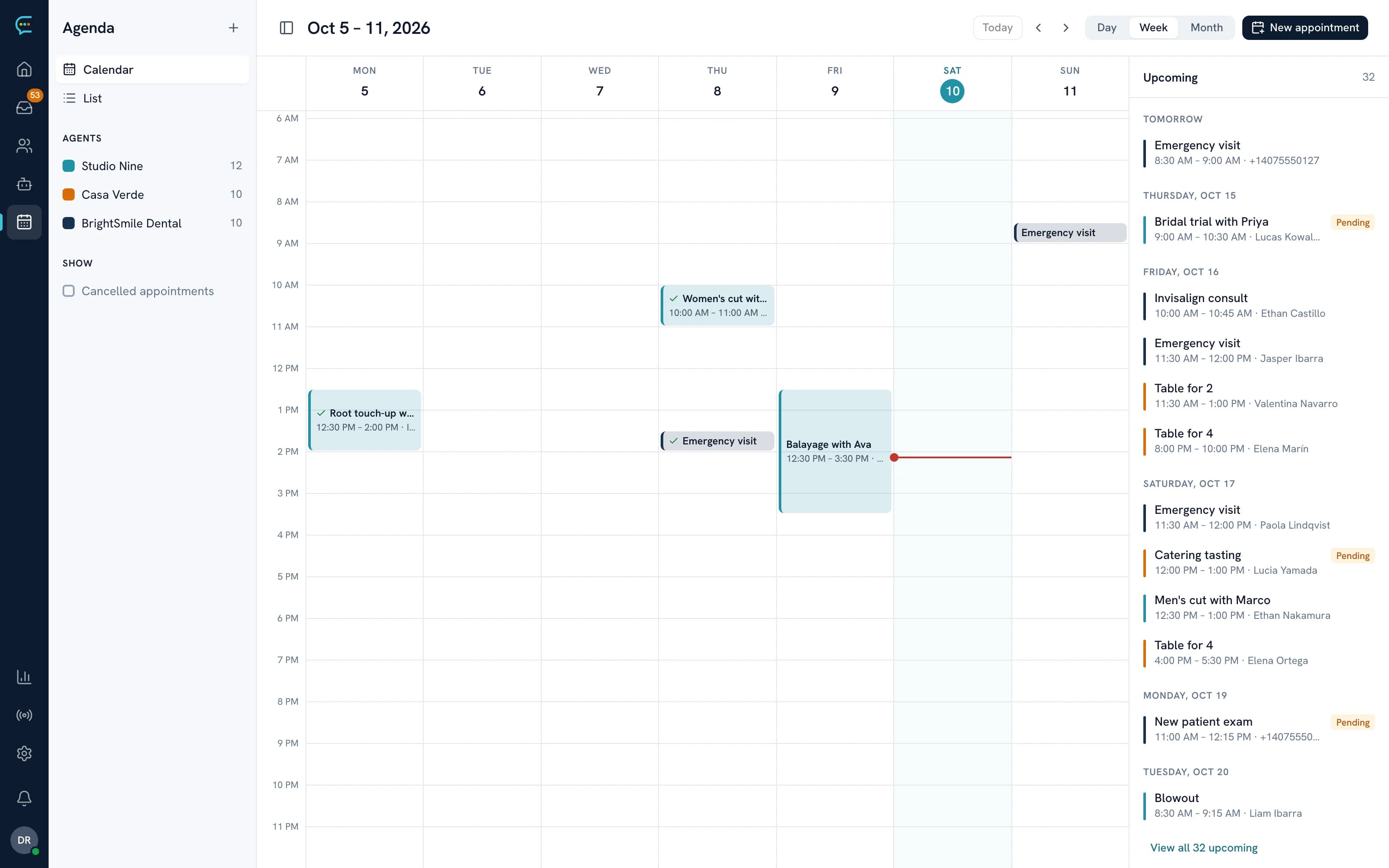
Customers book, reschedule and cancel inside the conversation, at any hour. The agent only offers times that are actually free and sends the reminders for you.

  • Real-time availability from your calendar
  • Confirmation on the channel the customer used
  • Reminders 24 hours and 1 hour before
  • Rescheduling and cancellations without a phone call
ConvoAI agenda with appointments booked by the AI agent

Start today

Every visitor, answered.

Put an AI agent on your website today. Start free with 1 AI agent and 65 AI replies every 2 weeks, then upgrade to Pro for unlimited AI replies.