Ticketing
Requests that outlastone conversation.
Some questions are answered in a minute. Others need finance, the warehouse or engineering. Tickets keep that work tracked, linked to the conversation it came from and visible to the customer.
The problem
When follow-up work lives in spreadsheets
- 01
A refund promised in chat is forgotten once the conversation closes.
Turn the request into a ticket with its own state and owner.
- 02
Customers write again to ask where things stand.
They follow progress in your help center's ticket portal.
- 03
The same bug is reported fifty times and nobody sees the pattern.
A Tracker ticket links every conversation about one problem.
Ticket types
Three kinds of work, one system
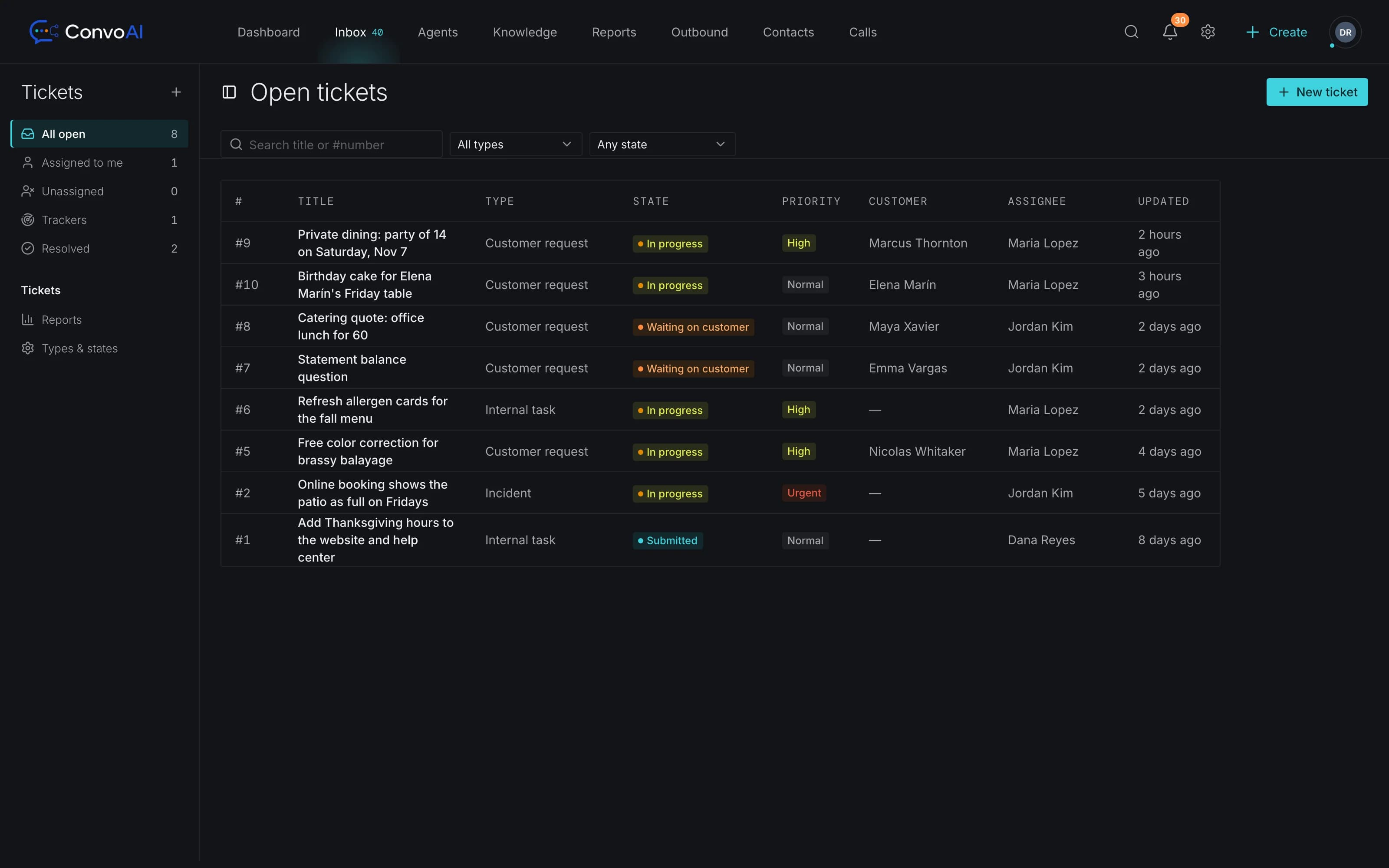
Customer tickets for requests the customer follows. Back-office tickets for internal work like approvals and replacements. Tracker tickets for problems that affect many customers at once. Name your types the way your team talks, like “Warranty request” or “Incident”.
- Custom states and attributes for each ticket type
- Comments for your team on every ticket
- Linked to the conversations they came from
- Saved views for each team's queue
How it works
From a chat to a resolved ticket
- Step 1Customer
A customer asks for a refund
In the website messenger, by email or on any connected channel.
- Step 2AI Employee
The AI gathers the details
It answers what it can and hands off when the request needs a person.
- Step 3Your team
A teammate opens a ticket
Linked to the conversation, with the right type, state and attributes.
- Step 4Customer
The customer follows along
Through a signed link to the ticket portal in your help center.
Built in
Everything a ticket needs to get done
Custom states
Model your real process, from new to waiting on finance to resolved.
Custom attributes
Order numbers, amounts, product lines: the fields each ticket type needs.
Linked conversations
Open a ticket from a conversation and keep every related chat attached.
Customer ticket portal
Customers see their tickets in your help center through a signed three-day email link.
Workflows on ticket events
Notify a team, change priority or message the customer when a ticket changes.
Ticket reports
See volume and progress across ticket types and states.
What's the difference between a conversation and a ticket?
A conversation is the chat, email or call itself. A ticket tracks a request that needs work after the conversation ends, like a refund, a replacement or a bug fix, and stays linked to the conversations it came from.
What ticket types are there?
Customer tickets for requests the customer follows, Back-office tickets for internal work your team does behind the scenes, and Tracker tickets that group many conversations about the same problem.
Can customers see their tickets?
Yes. Customers open their tickets in your help center's ticket portal through a signed link sent by email, valid for three days, and can follow the status and reply there.
Can I customise the states?
Yes. Each ticket type has its own states and custom attributes, so a refund can move through the steps your team actually uses.
Can tickets trigger automations?
Yes. Ticket events can start workflows, for example to notify a team, set a priority or follow up with the customer. See workflow automation.
Works together with
Get started
Keep every promise you make in chat
Start free and turn the requests that need follow-up into tickets your whole team can see.